Project control for AI-native work
All your AI work.
One station.
See which Claude Code and Codex sessions need you, across every project, IDE and terminal - and get back to the right one in one click.
Try everything free for 14 days. No card required. No automatic charge.
 RailSee which agent needs you, in every IDE and terminal.
 WorkspaceOne light window per project, with prompts built in.
 HarnessTeach every project how to work with AI, once.
The problem
Parallel AI work is fast.
Keeping track of it is not.
You start Claude Code in one project, Codex in another and a third agent in a terminal. Ten minutes later, nobody knows who is waiting for whom.
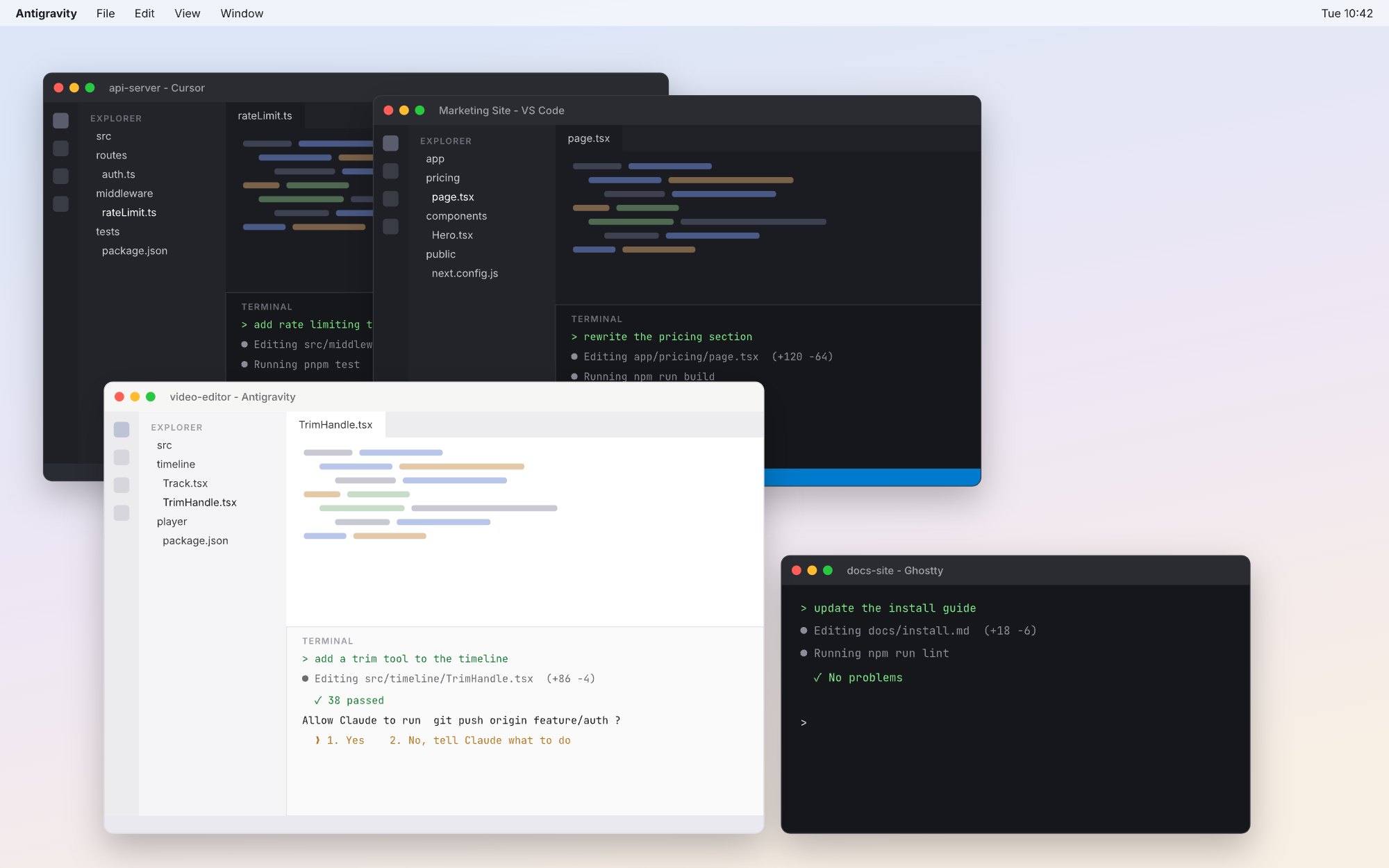 Finished 14 min ago. Nobody noticed.
Waiting for your OK since 10:28
Still working, or stuck?
Which window was docs-site?
Did Codex finish the API tests?
Agents wait in silence
A session asks for permission, then sits there for twenty minutes while you work somewhere else.
Done, but unnoticed
An agent wraps up its turn, and you only find out when you happen to look at that window again.
Every check costs a switch
⌘-Tab, find the window, scroll the terminal, remember what you asked. Then again for the next project.
Too many heavy windows
A full IDE per project, just to keep a terminal, a file tree and a preview open.
SwitchStation brings every project, agent and window into one station.
1 SwitchStation Rail
Every agent, every project,
at the edge of your screen.
Rail follows your Claude Code and Codex sessions across all your projects and tells you which one needs you. One click takes you back to the exact window, in any app.

 1 waiting · 2 done · 2 workingEvery project, one icon each.
video-editor · back in one click

- Cursor
- VS Code
- Antigravity
- Terminal
- iTerm2
- Ghostty
- Warp
- SwitchStation Workspace
Always on the edge
Collapsed, the rail is a slim strip with three counts: waiting, done, working. It never covers your work or steals focus.
One click back
Click a session and SwitchStation brings its window to the front, in the right app, on the right project.
Many projects in parallel
Group sessions by project, pin the ones you care about and give each an icon. The collapsed rail becomes a dock of projects.
Heard, even in another app
A banner, a spoken "Done" or "Waiting for you", or both - the moment a session needs you. Included in Free.
Set up in a minute
Rail installs lightweight hooks for Claude Code and Codex. They only report state and never block your agent.
Only what the agent reports
No AI summaries and no guessing: waiting for you, done, working or idle.
2 SwitchStation Workspace
A light workspace
for every project.
You don't need a full IDE to run agents. Workspace gives each project one small native window with files, previews and a deck of terminals - and it plugs straight into the Rail.
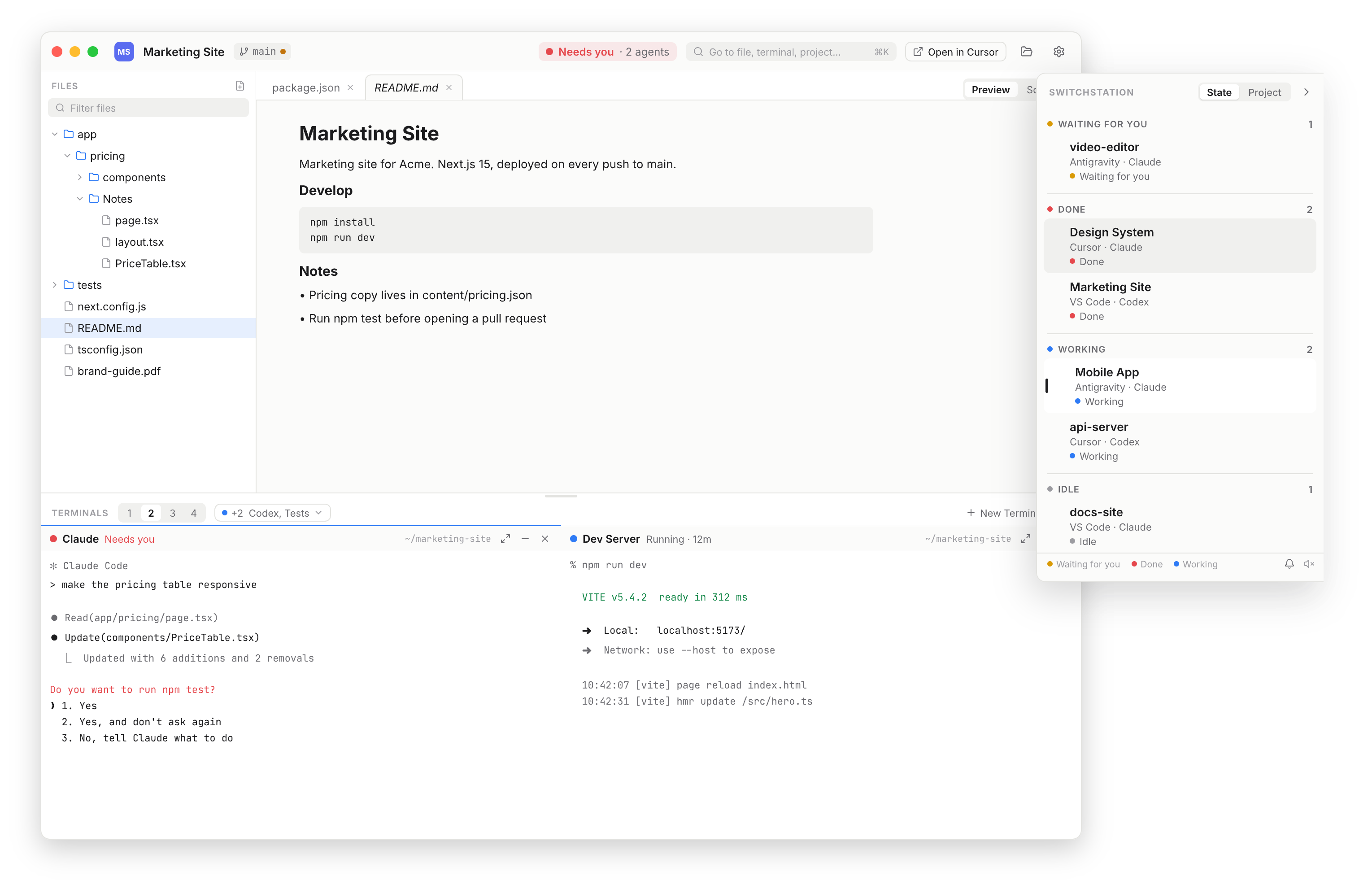
Light and native
A Mac app, not another IDE. Files, Markdown and image previews, quick edits and Git status. Open the full editor only when you need it.
Terminal deck for agents
Run Claude, Codex and your dev server side by side. Each column shows which agent runs in it and opens in the project folder.
Connected to the Rail
Sessions in Workspace show up on the Rail. Click one and you land in the right window and column.
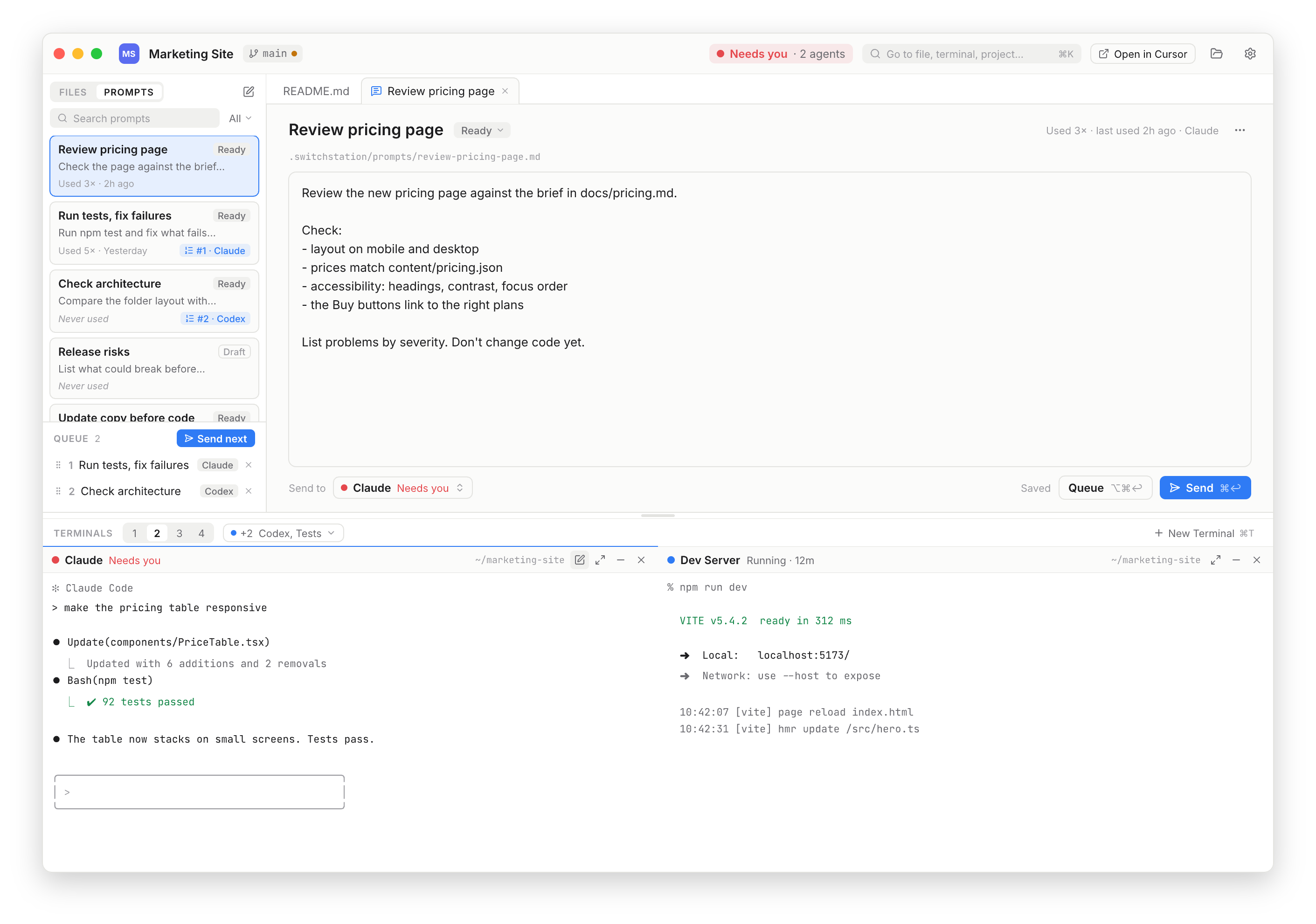
Prompts: write once, send anywhere.
Save prompts with the project, mention files, queue the next one and send it to any Claude or Codex column. Prompts are plain files you own.
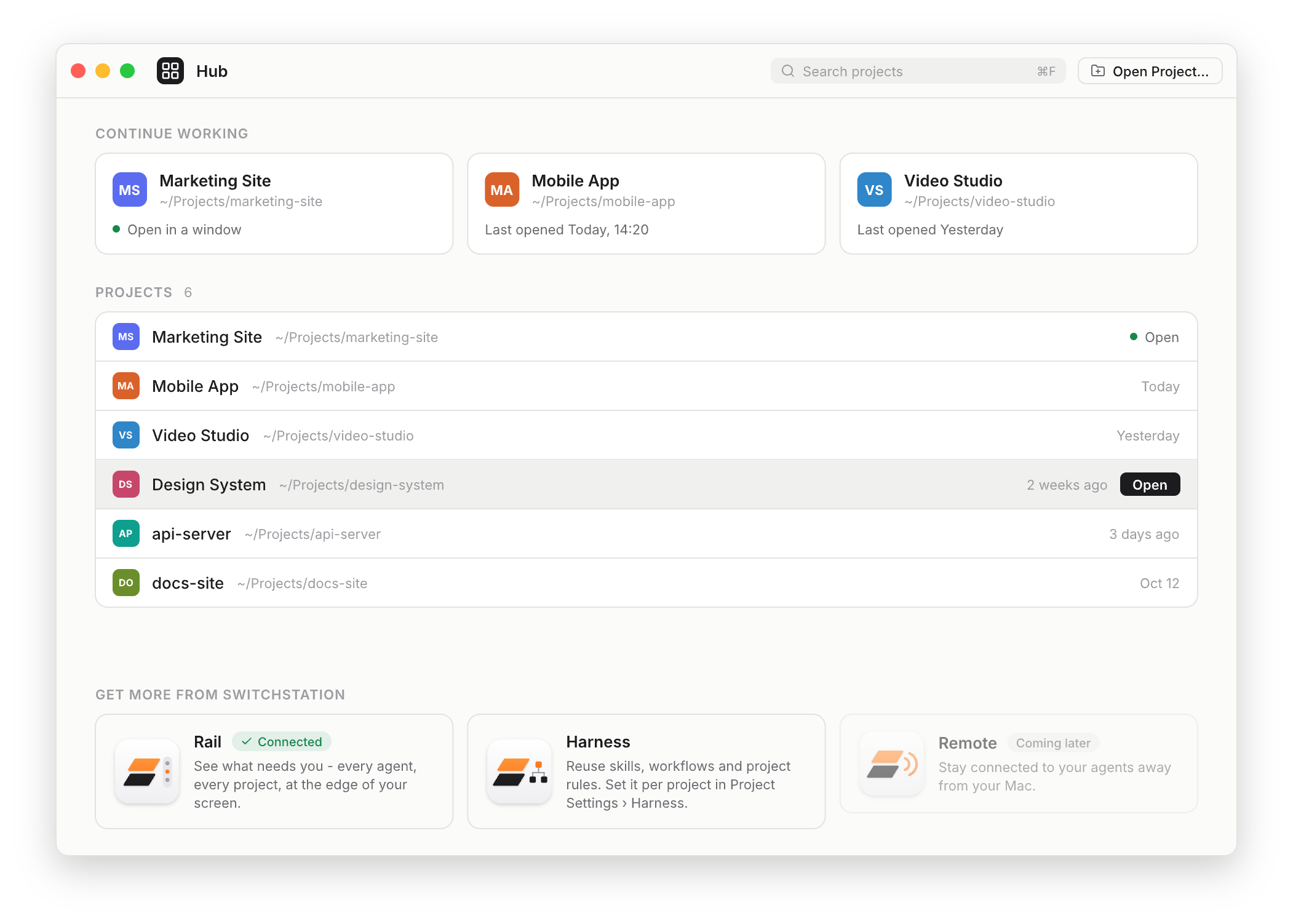
Hub: every project in one place.
Continue where you left off, find any project and open it in one click. The Hub also shows which parts of SwitchStation are set up.
3 SwitchStation Harness
Teach every project how to work with AI.
Once.
Every AI project ends up with its own CLAUDE.md, AGENTS.md, skills and rules - written by hand, a little different each time, and forgotten in the next repo. Harness turns what works into a reusable operating layer. Pick a profile, and the project gets the right skills, workflows and quality gates for Claude Code and Codex alike.
Harness profile
Web App · v0.1.1 · pinned
- 23 skills & workflows
- Quality gates
- Artifact templates
CLAUDE.md · .claude/skills · hooksAGENTS.md · .codex/ · hooksone adapter awayStart at your best
A new project inherits your proven way of working on day one: planning, specs, reviews, testing and release.
One setup, every agent
Write a workflow once. Harness adapts it for Claude Code and Codex, so switching agents never means starting over.
Gates, not hopes
Rules and checks run at the right moment - before code, before a commit, before a release - instead of living in a doc nobody reads.
Versioned and safe
Pin a version, update when you are ready, and keep your own project rules on top. A project with its own AI setup is left as it is.
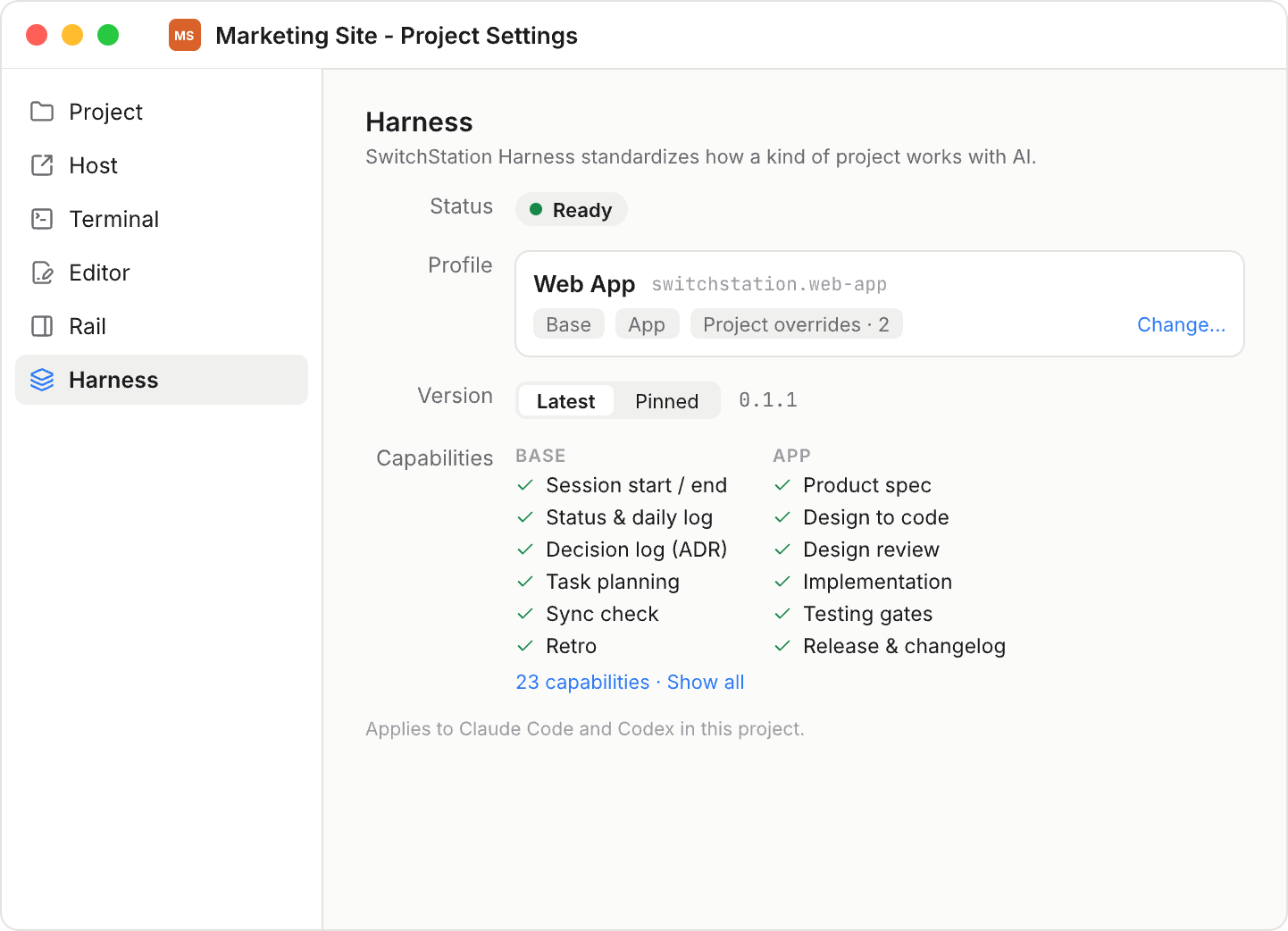
Every project shows how it works with AI.
Project Settings shows the profile, the packs it is built from, its version and every capability - so you always know which rules your agents follow in this project.
Web appiOS appVideoWritingResearch
4 SwitchStation Remote Coming soon
Your agents, in your pocket.
Step away from your Mac without losing the thread. Remote pairs your iPhone with SwitchStation and keeps every session within reach.
- Live status of every project and session, wherever you are.
- Notified the moment an agent waits for you or finishes.
- Answer and approve from your phone, then let the agent carry on.
- Private by design: pairs directly with your Mac. No account required.
Pricing
Free with no time limit. Try everything for 14 days, then pay once if you need more.
Free
- 3 active projects
- 2 AI sessions monitored at a time
- Rail, one-click switching, notifications
- Workspace: 1 project window
- Hub and Prompts (10 per project)
Rail
- Unlimited projects on the Rail
- Unlimited monitored AI sessions
- Rail, one-click switching, notifications
- Workspace, Hub and Prompts at Free level
SwitchStation
- Everything in Rail
- Unlimited active projects and Workspace windows
- Unlimited saved prompts and queue
- Full local Harness
Already have Rail? Upgrade to SwitchStation for $15. Prices in USD; taxes may apply. Payments are processed by Lemon Squeezy, our reseller and Merchant of Record. Your license key is sent by email right after purchase. 14-day money-back guarantee.
Compare licenses
| Free | Rail | SwitchStation | |
|---|---|---|---|
| Rail | |||
| Projects on the Rail | 3 | Unlimited | Unlimited |
| Monitored AI sessions | 2 | Unlimited | Unlimited |
| Rail, switching, notifications | ✓ | ✓ | ✓ |
| Workspace, Hub & Prompts | |||
| Active projects in Workspace | 3 | Free level | Unlimited |
| Workspace windows | 1 | Free level | Unlimited |
| Hub | ✓ | ✓ | ✓ |
| Saved prompts per project | 10 | Free level | Unlimited |
| Prompt queue per project | 1 | Free level | Unlimited |
| Harness | Community | Free level | Full local |
Going over a limit never deletes anything. Projects beyond the limit become Inactive and stay in the Hub; you choose which ones are active.
Request early access.
SwitchStation is in early access while we finish the public release. Tell us a little about how you work with AI agents and we will send you a build.
Email info@sssflow.commacOS 14 Sonoma or later · Apple silicon and Intel
Your work stays on your Mac.
SwitchStation never reads, stores or sends your prompts, agent responses, transcripts, file contents or source code. The app only sends anonymous usage counts, which you can turn off in Settings, and talks to Lemon Squeezy to activate or check your license. Read the privacy policy.
FAQ
Which agents are supported?
Claude Code and OpenAI Codex CLI, in any terminal or editor that runs them on your Mac, and in SwitchStation Workspace.
What happens when the trial ends?
Nothing is charged and nothing is deleted. SwitchStation continues in Free. If you have more projects than Free allows, the extra ones become Inactive and you choose which ones stay active.
Rail or SwitchStation - which do I need?
Rail is enough if you mainly work in your own terminal or editor and want to see every session at once. SwitchStation adds the full Workspace: unlimited project windows, prompts and the local Harness. You can upgrade from Rail later for $15.
Is it a subscription?
No. You pay once and keep the license for life. It includes 2 years of updates from the date of purchase; after that, the update policy may change.
How many Macs can I use?
Up to 3 Macs per license. To move a license, deactivate it in Settings on the old Mac and activate it on the new one. If you no longer have the old Mac, email us.
What if it does not work for me?
Email us within 14 days of purchase for a full refund. See the refund policy.
Does it need Accessibility permission?
Only to bring the right window to the front. The rail itself works without it.