
How to Stop Losing Track of Parallel AI Work
Parallel AI work gets lost when you track it with a single list. Three different things change at different speeds - the backlog of what work exists, the runtime of what is running right now, and the attention queue of where you should act next. Keep them in three separate layers; a notification feeds the attention queue, it does not replace it.
Three AI tasks finish in different windows while you are in a fourth. Half an hour later you remember two of them. The third you only find when you glance at that terminal the next day - the agent has been idle, waiting for a question you never answered.
The reflex is to build a better task list: Linear, Notion, a markdown file. Those help with what work exists, but they do not solve the problem you actually hit, which is "where should I act now?"
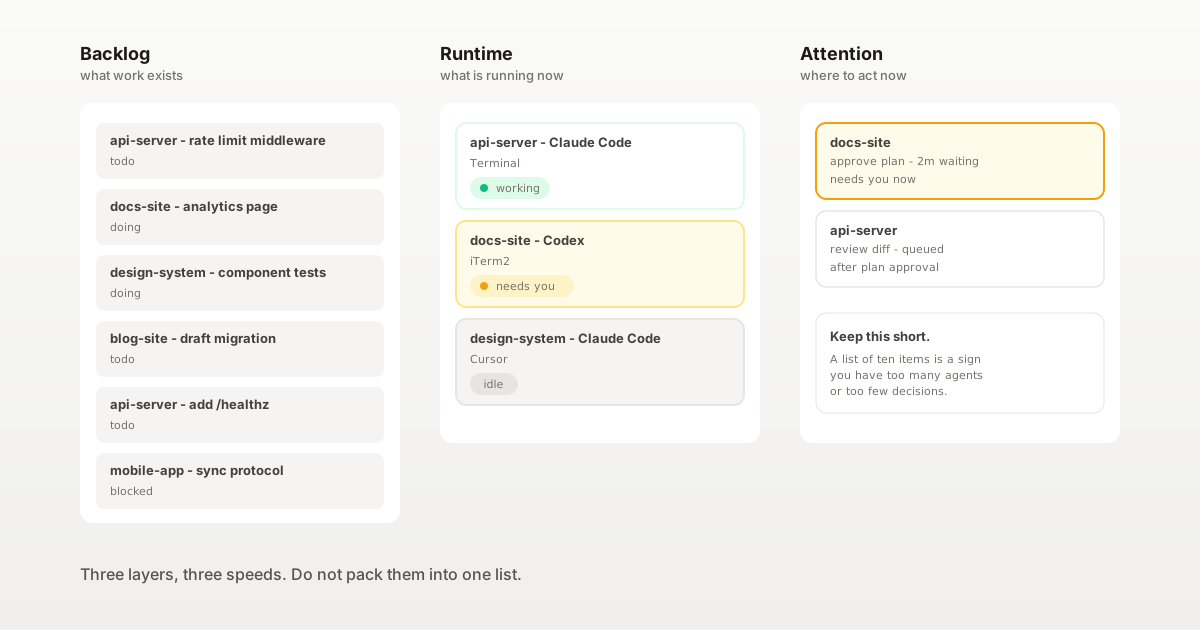
Key idea: a task list answers what exists. An attention queue answers where should I act now. They are not the same list.
Why does one list fail for parallel AI work?
Parallel AI work breaks when you try to track it with a single list. Three distinct things change at different speeds:
Backlog   - what work exists                     (changes weekly)
Runtime   - which sessions are running right now (changes every few minutes)
Attention - where you should act next             (changes every few seconds)
Treating these as one list is the mistake. A tracker updated every few seconds becomes noise; a tracker updated weekly cannot tell you an agent has been stuck for an hour.
The move is to keep the three layers separate and let each one update at its own speed.
What are the three layers?
Backlog - "what work exists"
Long. Durable. Updated when work changes shape, not when work changes state.
Keep it where you already manage work: a GitHub project, Linear, Notion, a markdown file in each repo. Each entry has a stable name, an outcome and a status in your usual coarse set (todo, doing, done, blocked).
A healthy backlog can have twenty items across five projects. Only a few of them are running on any given day.
Runtime - "which sessions are running right now"
Short-lived. Fast. One row per running agent session.
Minimum fields per row:
project
tool  (Claude Code / Codex / Cursor / ...)
state (working / waiting / idle / done)
host window
Runtime is not a backlog subset. A running session may be exploring something you have not yet written in the backlog, and a backlog item may have no runtime row because no agent is on it today.
Attention - "where should I act now"
Shortest. Ordered. One line per thing that needs a human action, in the order you intend to handle them.
Minimum fields per row:
project
what it needs  (approve / review / unblock / merge)
first noticed  (so stale items float up)
A session can be running but not waiting for you. A session can be waiting for you for ten minutes before you notice. The attention queue is the view that tells you to notice.
Rule: backlog, runtime and attention update at different speeds. Pick one tool per layer; do not put the fast one inside the slow one.
Where does parallel work get lost?
Three failure modes account for most "lost" sessions.
A session finishes and you miss it. The runtime row flips to done. If nothing moves that row into attention, you only notice when you glance at the window. Fix: a notification on Stop that posts a banner or a sound, and a cell that stays visible on the runtime surface until you acknowledge it.
A session waits for you silently. The runtime row sits in waiting. No sound, no banner, no attention entry. Fix: a notification on the Notification event, plus a persistent attention row that outlives the banner. Banners vanish in five seconds; the attention queue should not.
A session is idle but still open. Not running, not finished - just open. These accumulate because no layer owns them. Fix: a short daily sweep. If a runtime row has been idle for a day, either promote it to attention ("decide if we are still working on this") or close it.
How do you set up each layer?
Backlog. Use the tool you already use for work. Do not introduce a new one just for AI tasks. One row per outcome, not per agent run. Update when the shape changes - not when state changes.
Runtime. One row per running agent session, auto-maintained. States coarse enough to be useful: working, waiting, idle, done. Ideally cross-project and cross-tool.
Attention. One ordered list. On paper is fine for a start. Items join when a session asks for input, finishes, or has been idle too long. Items leave when you have acted on them. If the attention queue is longer than ten lines, the problem is upstream - too many agents, or too few decisions.
What native options already exist?
A few setups partially cover the three layers.
| Approach | Covers | Misses |
|---|---|---|
| Project tracker (Linear, Notion, GitHub Projects) | Backlog | Runtime and attention |
| Provider-native session sidebar (Claude Code Desktop, Codex) | Runtime inside that one provider | Does not reach across tools |
| Terminal titles, tmux session names | Runtime for sessions you already know about | The one you forgot |
| macOS notifications from lifecycle hooks | Signal into attention | A banner that disappears in five seconds is not a queue |
The gap: a persistent attention queue that spans tools and projects. That is the layer that is usually missing when parallel AI work gets lost.
Where does SwitchStation fit?
SwitchStation by SSS Flow addresses the Runtime and Attention layers; the Backlog layer stays in whatever tracker you already use.
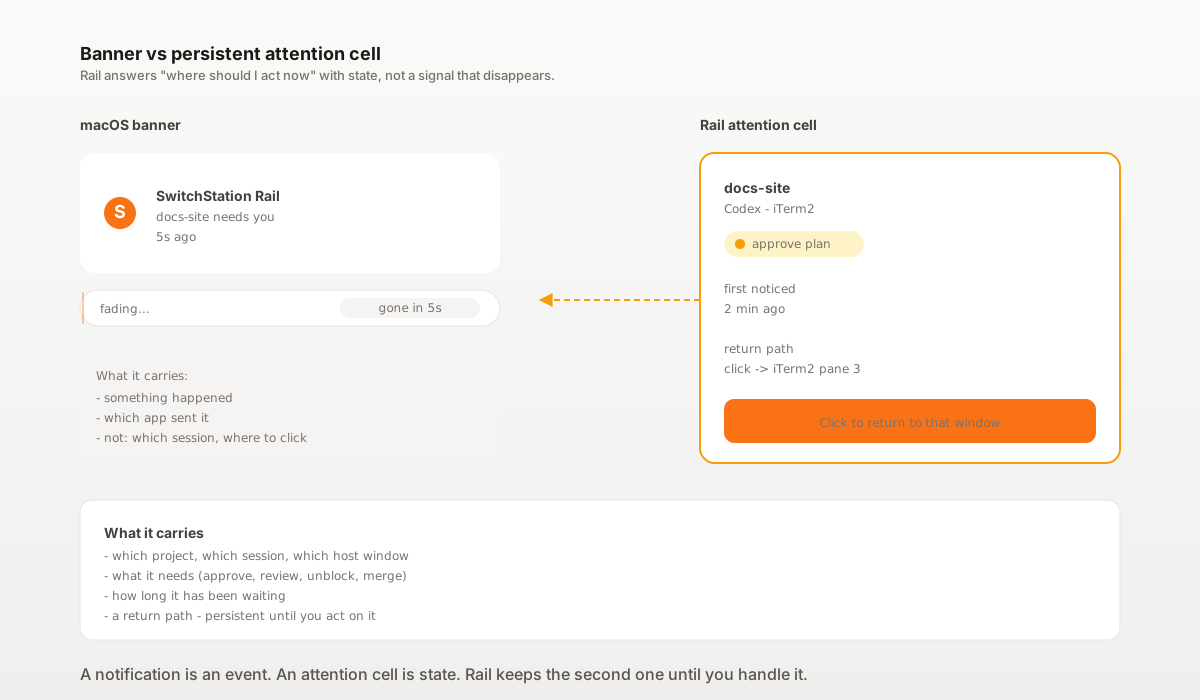
Rail (attention + runtime). The thin vertical strip at the right of your main screen. It groups every detected Claude Code and Codex CLI session by project with three states: working, waiting for you, idle. A session that needs you shows up as a persistent cell, not a disappearing banner. One click brings back the exact window - whether it is Terminal, iTerm2, Ghostty, Warp, Cursor, VS Code, Antigravity or SwitchStation Workspace.
Hub (runtime inventory). Hub, inside SwitchStation Workspace, is the per-user project registry. Projects you own live there whether or not a window is open. When you want a view of "which projects exist and which are active today", Hub answers it.
Rail Core and the hook bridge stay local - no network traffic, no prompt or response logging, no reading source code.
Boundary
SwitchStation is not a full project-management replacement. It does not store your backlog, prioritise your work, or decide what should become an attention item - except for signals that come from the agent lifecycle. The three-layer model stays yours; SwitchStation only maintains the two faster layers.
Which layer should you set up first?
| Current pain | Start with |
|---|---|
| Agents finish and you only find out hours later | Hook on Stop with sound + banner |
| Agents wait for you silently | Hook on Notification + a persistent attention surface |
| You forget which projects you have agents in | A runtime view across tools, like Rail |
| Your tracker is drowning in agent state | Pull agent state out of the tracker into a separate layer |
| Your attention queue is longer than ten lines | Reduce the number of agents, not the surface |
What is the mental model to keep?
Backlog   = inventory
Runtime   = state
Attention = next action
Each one lives in a different tool and updates at a different speed. The failure mode is trying to force all three into one list.
What should you do next?
If your tracker is already fine but you keep missing agent events, start by splitting Runtime off into its own view. If you want a persistent attention queue across tools and projects, see how SwitchStation Rail works.
Then read:
- How to Manage Multiple AI Coding Projects on a Mac
- Claude Code Notifications: Know When a Session Is Done
FAQ
Why not just use my project tracker for everything?
Trackers are built for weekly change. Agent sessions change every few minutes. Forcing both into one tool makes the tracker noisy and the attention signal slow. Keep them separate.
Is the attention queue the same as a notification?
A notification is an event ("something happened"). An attention queue is state ("these items are still waiting for me"). A notification feeds the queue; it does not replace it.
What is the minimum useful setup?
A tracker you already use (backlog), a lifecycle hook that fires on Notification + Stop (signals), and a sheet or sticky note where you write items that need your action and cross them off (attention). You can graduate to a running surface like Rail when the sticky note gets long.