
Claude Code notifications - know when a session is done
Claude Code supports hooks that fire on key session events; the two most useful are Notification (when Claude needs you) and Stop (when a turn ends). You can wire them to a sound or macOS banner in a few lines of settings. One session - a sound is enough. Several sessions - a session rail that shows which one needs you is the next step.
You start a Claude Code task and switch to Slack. Twenty minutes later you check back and Claude has been waiting for permission for eighteen of them. Claude Code (October 2026) supports hooks that can tell you that a session needs you - this guide covers how to wire them, what they can and cannot do, and the one case where sounds and banners stop being enough.
What hooks does Claude Code expose?
Claude Code fires six hook events during a session. Each one runs a shell command you configure and receives a small JSON payload on standard input.
| Event | Fires when | Common use |
|---|---|---|
PreToolUse | Claude is about to run a tool | Audit log, warning sound |
PostToolUse | A tool just returned | Log the result |
Notification | Claude needs your attention (permission, plan approval, a question) | The main "needs you" signal |
Stop | The current turn ends | The main "done" signal |
SubagentStop | A subagent turn ends | Progress tracking for long plans |
UserPromptSubmit | You sent a prompt | Audit log |
The payload Claude passes includes session_id, cwd (the working directory the session started in) and hook_event_name, plus event-specific extras. For a quick notification, you only need the fact that the event fired.
How do you set up a basic sound or banner notification?
Edit ~/.claude/settings.json to add a hooks block. Make a backup first.
{
  "hooks": {
    "Notification": [
      {
        "hooks": [
          {
            "type": "command",
            "command": "afplay /System/Library/Sounds/Ping.aiff && osascript -e 'display notification \"Claude needs you\" with title \"Claude Code\"'"
          }
        ]
      }
    ],
    "Stop": [
      {
        "hooks": [
          {
            "type": "command",
            "command": "afplay /System/Library/Sounds/Glass.aiff"
          }
        ]
      }
    ]
  }
}afplayis a built-in macOS CLI; the file paths are the system sounds, which exist on every Mac.osascriptposts a banner through macOS Notification Center.- Save, close the running Claude Code session, and start a new one so it reads the updated config.
For Codex and other agents the pattern is similar, but the hook schema is different; see the agent's own docs.
What does a notification tell you - and not?
A notification tells you that something happened. It does not tell you:
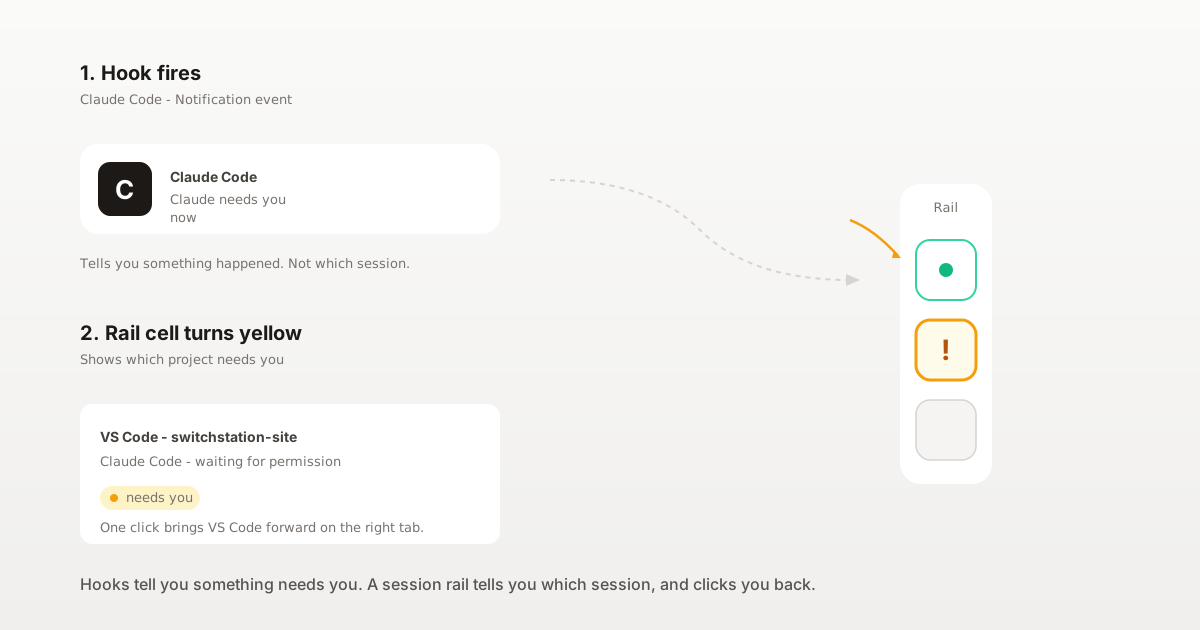
- Which session. If you have Claude Code running in three terminals, three sessions share one sound. The banner says "Claude Code" without which project.
- How to return. The banner trails off in Notification Center after a few seconds. You still ⌘-Tab to find the right window and scroll back in the terminal to see what Claude asked.
- What state the session is in now. A
Notificationhook fired five minutes ago is no proof the session still needs you - maybe you already answered it, maybe the request timed out.
For one or two sessions on one Mac, sound-only is enough. Beyond that, "that" is not useful without "which".
How do you combine notifications with a session rail?
A session rail is a thin UI, always visible, that lists every Claude Code (and Codex) session on your Mac and shows each one's state in real time. SwitchStation Rail by SSS Flow is one such rail: it installs the same hook events (Notification, Stop, PreToolUse, …) through install.sh, which merges the hooks into your ~/.claude/settings.json rather than replacing yours (back up before letting any installer touch that file).
When Notification fires, the cell for that project turns yellow with a dot. Click → focus the exact tab in Cursor, VS Code, Terminal, iTerm2, Ghostty, Warp or SwitchStation Workspace. When Stop fires, the cell goes dark. The hook payload Rail reads is only session_id, cwd and hook_event_name - no prompts, no responses, no code (SwitchStation is local-first by design).
A rail does not replace the sound; it adds the "which" the sound is missing. Keep the sound if you like it; the rail is what lets you act on it in one click.
When does a rail start to earn its place?
- One session, you work in its window all day: a sound or banner is enough.
- Two or three sessions, same editor, same project area: banners still work; you learn to recognize them by context.
- Three or more sessions across projects: you spend more time hunting the right window than acting on the agent. This is the point to add a session rail.
For the full setup for parallel sessions, see How to run multiple Claude Code sessions and keep track.
What should you do next?
Add a Notification and a Stop hook today, pick system sounds you can tell apart, back up settings.json first, and start a new session so Claude Code picks up the config. Live with it for a week. When you catch yourself ⌘-Tabbing to find which session beeped, that is your signal to add a rail.