
How to manage multiple AI coding projects on a Mac
Managing multiple AI coding projects well is less about running more agents and more about one window per project, consistent naming, and an attention layer that tells you which session is waiting. Keep 2 or 3 projects "hot" at a time, let a session rail show their state, and do a short end-of-day checkpoint in each.
AI coding started as "add an agent to one project". Six weeks in, you have an agent in five projects and no idea which one is waiting for your reply. This guide covers how to set up multiple AI coding projects so you can run several in parallel without losing track - the setup, the limits, and the one tool category most dev stacks are missing.
Why do multiple AI coding projects get out of hand?
Each editor only sees its own tabs. Terminal apps only see their own windows. Claude Code and Codex each run in their own session with no central tracker across projects. When you add a project, you add another window to a stack nobody is counting.
The failure is not the AI agent. The failure is the project list: every project is tracked by where it is open, which is a different place for every project.
What goes wrong when you don't have a system?
| Symptom | What it looks like |
|---|---|
| Lost sessions | A Claude Code session in blog-site has been waiting for permission for 40 minutes. You forgot the window exists. |
| Dock sprawl | Six Cursor windows, three VS Code windows, two Terminal windows - all for projects. |
| Context jumps | Every ⌘-Tab lands on the wrong project. You start reading the wrong code, then switch again. |
| Daily restart penalty | Reopening yesterday's setup takes 10 minutes: which project was active, which prompts were open, which agent was mid-task. |
| Checkpoint drift | Some projects are halfway through a plan Claude wrote three days ago. You don't remember if it ran or stopped. |
How do you set up projects so you can run several at once?
- One project - one window. Decide the home window for each project (Cursor, VS Code, Terminal app, or SwitchStation Workspace) and keep it there. A window always means one project.
- Name things once, use the name everywhere. Folder, editor workspace file, repo and the title you give the window all use the same name. Then the window title tells you which project you are in without reading the files.
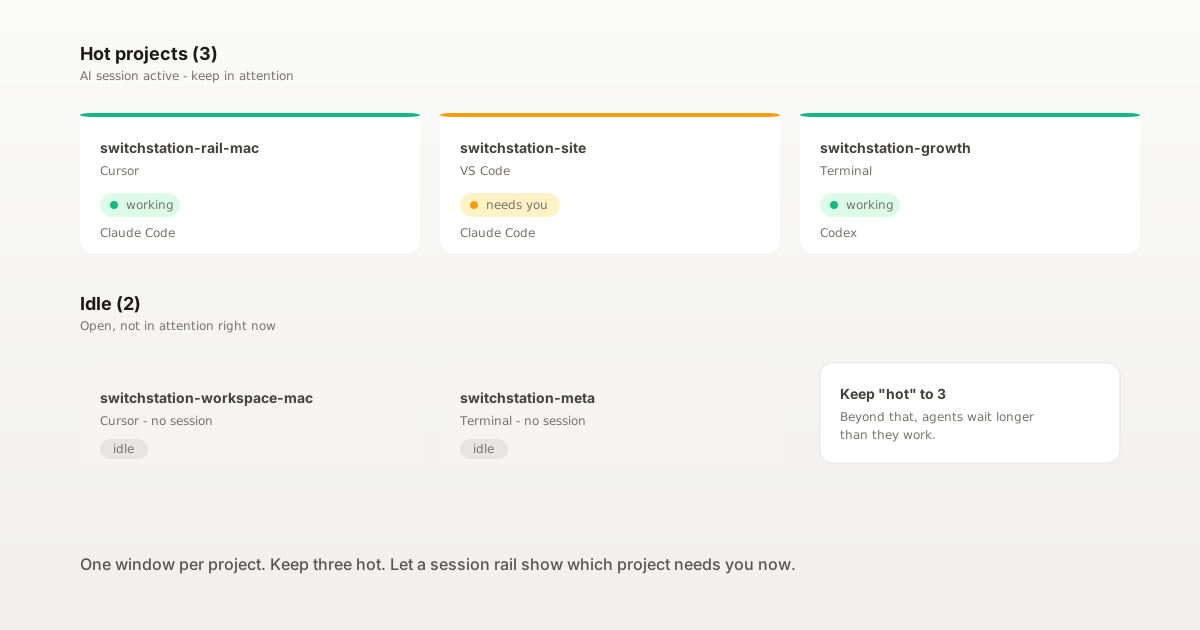
- Keep 2 or 3 projects "hot" at a time. "Hot" means an AI session is active. Everything else is open but idle. Three hot projects is the limit most people can hold in attention. Beyond that, agents wait longer than they work.
- Have one place that shows every project's AI state. Without that, you check each window to find the one you need. With it, the sessions tell you where to go.
- Checkpoint each project at the end of the day. Commit or stash, write the next step at the top of a notes file, and stop any agent you are not planning to resume. This saves the first ten minutes of tomorrow.
What are the main approaches to managing multi-project AI work?
| Approach | What it gives you | What it does not |
|---|---|---|
| One Cursor or VS Code window per project | Files, terminal and preview grouped by project | A heavy editor per project just to hold a terminal; no cross-project AI state |
| Multi-root workspace (one editor, many folders) | One process, many projects | No way to see which folder's agent is active |
| Terminal with tabs named after projects | Lightweight | Loses the file tree and preview; no AI state |
| macOS Spaces or Stage Manager | Visual separation by project | Still no AI state; you still open windows to check |
| A session rail across editors (SwitchStation Rail) | Every Claude Code and Codex session on your Mac, grouped by project, one click to the right window | Does not replace the editor, does not run the agent, does not understand prompts |
The first four approaches organize the windows. The last approach adds the missing piece: a layer that tracks sessions across windows.
How do you keep attention across projects?
Three options, from lightest to heaviest:
- Pull notifications only. Wire Claude Code hooks (
Notification,Stop) to a sound or macOS banner. Fast to set up; tells you that a session needs you. - A session rail at the screen edge. SwitchStation Rail by SSS Flow shows every session on your Mac, grouped by project, with its state (working, waiting, idle). One click brings back the right window in Cursor, VS Code, Terminal, iTerm2, Ghostty, Warp or SwitchStation Workspace. Rail is local-first: it never reads your prompts or code (ADR-027), only session id, working directory and event name.
- A project workspace mode. SwitchStation Workspace puts files, previews, a terminal deck for your agents and saved project prompts in one window per project. Use it for projects you work in daily; keep the lighter editors for one-off touches.
Scale guidance: 1 or 2 projects, pull notifications are enough. 3 to 5, add a rail. 5 or more and you work in them daily, add a project workspace mode for the top two or three.
What are the right limits?
Keep an active-project ceiling, not a project ceiling. SwitchStation Rail Free covers 3 active projects at a time with no time limit; many people find this is the sustainable ceiling anyway. If you have 20 projects on disk, that is fine - most should be idle.
For a related problem (running several Claude Code sessions in one project or across projects), see How to run multiple Claude Code sessions and keep track.
What should you do next?
Pick a window home for each active project. Use one name everywhere. Keep "hot" to 3. Add a session rail when windows alone stop being enough. The number of projects you can run in parallel is not limited by your AI agent - it is limited by how fast you can find the project that needs you.